Lifecycle

For complete understanding of the in-app purchase lifecycle, flow diagrams, and state management, please visit:
Lifecycle Documentation - openiap.dev
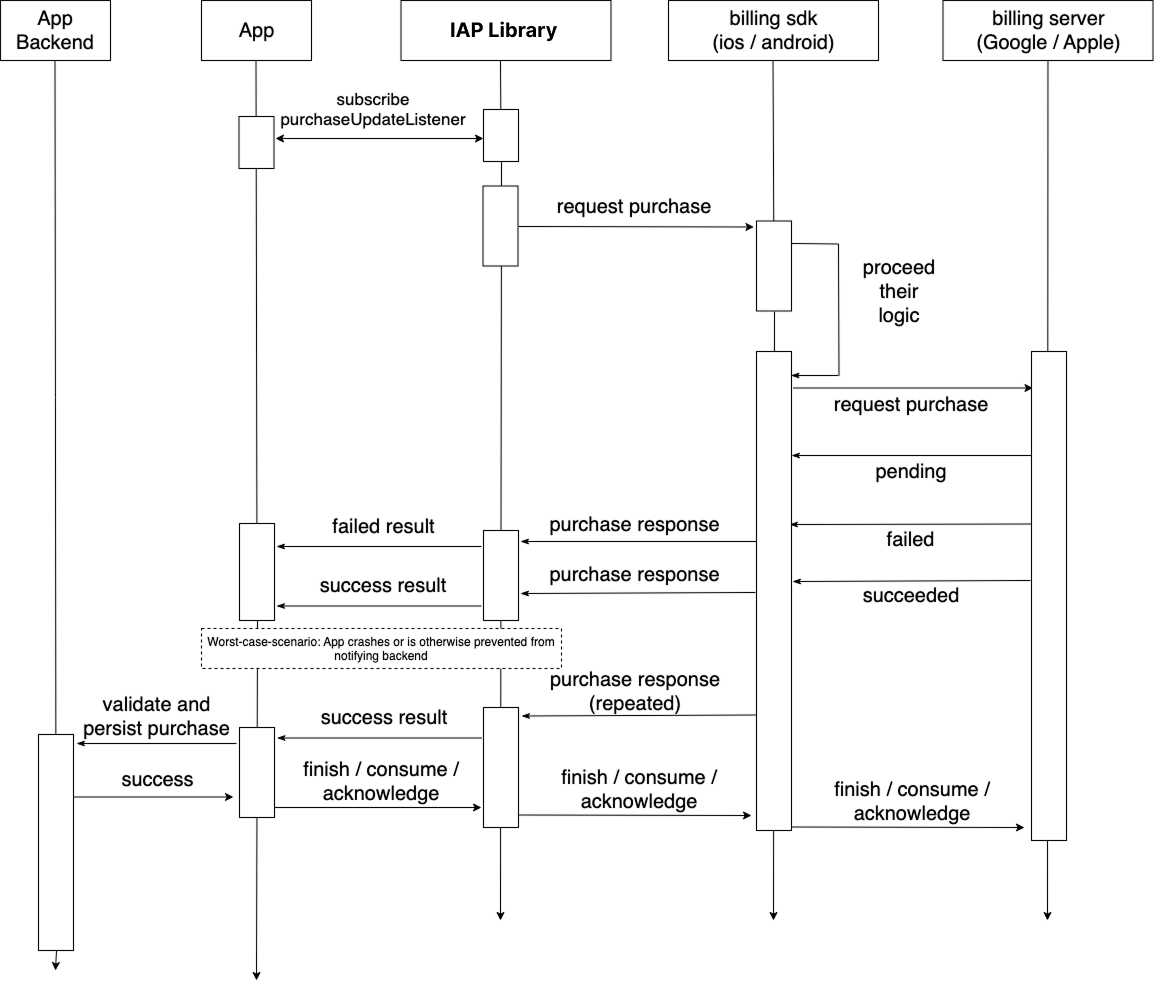
The Open IAP specification provides detailed documentation on:
- Complete purchase flow
- State transitions and management
- Connection lifecycle
- Error recovery patterns
- Platform-specific considerations
Implementation with GodotIap
Connection Management
Understanding the connection lifecycle is crucial for reliable IAP implementation.
Connection States
The connection can be in several states:
- Disconnected: Initial state, no connection to store
- Connecting: Attempting to establish connection
- Connected: Successfully connected, ready for operations
- Error: Connection failed
Basic Connection Flow
extends Node

const Types = preload("res://addons/godot-iap/types.gd")

@onready var iap = $GodotIapWrapper

var is_connected: bool = false

func _ready():
    _setup_signals()
    _initialize_connection()

func _setup_signals():
    iap.purchase_updated.connect(_on_purchase_updated)
    iap.purchase_error.connect(_on_purchase_error)
    iap.products_fetched.connect(_on_products_fetched)
    iap.connected.connect(_on_connected)

func _initialize_connection():
    # Returns bool - true if connection successful
    is_connected = iap.init_connection()

    if is_connected:
        print("Connected to store")
        _load_products()
    else:
        print("Failed to connect")
        _on_connection_failed()

func _load_products():
    if is_connected:
        var request = Types.ProductRequest.new()
        var skus: Array[String] = ["coins_100", "premium"]
        request.skus = skus
        request.type = Types.ProductQueryType.ALL

        var products = iap.fetch_products(request)
        for product in products:
            print("Product: ", product.id, " - ", product.display_price)

func _on_connected():
    is_connected = true
    print("Store connected")
Handling Connection States
var connection_error: String = ""

func _initialize_connection():
    is_connected = iap.init_connection()

    if is_connected:
        connection_error = ""
        _on_connected_successfully()
    else:
        is_connected = false
        connection_error = "Failed to connect to store"
        _on_connection_failed()

func _on_connected_successfully():
    print("Store connected, loading products...")
    _load_products()

func _on_connection_failed():
    print("Connection failed: ", connection_error)
    # Show retry UI to user
    show_retry_button()

func retry_connection():
    print("Retrying connection...")
    _initialize_connection()
Component Lifecycle Integration
Scene Lifecycle
extends Node

const Types = preload("res://addons/godot-iap/types.gd")

@onready var iap = $GodotIapWrapper

func _ready():
    # Initialize IAP when scene loads
    _setup_signals()
    _initialize()

func _exit_tree():
    # Clean up when scene is removed
    if iap:
        # Disconnect signals if needed
        if iap.purchase_updated.is_connected(_on_purchase_updated):
            iap.purchase_updated.disconnect(_on_purchase_updated)
        if iap.purchase_error.is_connected(_on_purchase_error):
            iap.purchase_error.disconnect(_on_purchase_error)

        # End connection
        iap.end_connection()

func _setup_signals():
    iap.purchase_updated.connect(_on_purchase_updated)
    iap.purchase_error.connect(_on_purchase_error)
    iap.products_fetched.connect(_on_products_fetched)
    iap.connected.connect(_on_connected)

func _initialize():
    if iap.init_connection():
        _load_products()

func _on_connected():
    print("Store connected")

func _on_purchase_updated(purchase: Dictionary):
    # Handle purchase updates
    pass

func _on_purchase_error(error: Dictionary):
    # Handle purchase errors
    pass

func _on_products_fetched(result: Dictionary):
    # Handle fetched products
    pass

func _load_products():
    var request = Types.ProductRequest.new()
    var skus: Array[String] = ["coins_100", "premium"]
    request.skus = skus
    request.type = Types.ProductQueryType.ALL
    iap.fetch_products(request)
Autoload Pattern (Recommended)
For persistent IAP management, use an Autoload singleton:
# iap_manager.gd - Add this as an Autoload
extends Node

const Types = preload("res://addons/godot-iap/types.gd")

@onready var iap = $GodotIapWrapper

var is_connected: bool = false
var products: Array = []
var subscriptions: Array = []

signal iap_connected
signal iap_disconnected
signal iap_error(error: Dictionary)
signal products_loaded(products: Array)
signal purchase_completed(purchase: Dictionary)
signal purchase_failed(error: Dictionary)

func _ready():
    # Note: In Autoload, $GodotIapWrapper must be added as a child node
    # Alternatively, create the node dynamically:
    _setup_iap_node()
    _setup_signals()
    _initialize()

func _setup_iap_node():
    # If using Autoload, you need to add GodotIapWrapper as a child
    var wrapper = preload("res://addons/godot-iap/godot_iap.gd").new()
    wrapper.name = "GodotIapWrapper"
    add_child(wrapper)
    iap = wrapper

func _setup_signals():
    iap.purchase_updated.connect(_on_purchase_updated)
    iap.purchase_error.connect(_on_purchase_error)
    iap.products_fetched.connect(_on_products_fetched)
    iap.connected.connect(_on_connected)
    iap.disconnected.connect(_on_disconnected)

func _initialize():
    is_connected = iap.init_connection()
    if is_connected:
        iap_connected.emit()

func _on_connected():
    is_connected = true
    iap_connected.emit()

func _on_disconnected():
    is_connected = false
    iap_disconnected.emit()

func _on_purchase_updated(purchase: Dictionary):
    purchase_completed.emit(purchase)

func _on_purchase_error(error: Dictionary):
    purchase_failed.emit(error)

func _on_products_fetched(result: Dictionary):
    if result.has("products"):
        products = result["products"]
        products_loaded.emit(products)

# Public API
func load_products(product_ids: Array[String]):
    if is_connected:
        var request = Types.ProductRequest.new()
        request.skus = product_ids
        request.type = Types.ProductQueryType.ALL
        products = iap.fetch_products(request)
        products_loaded.emit(products)

func load_subscriptions(sub_ids: Array[String]):
    if is_connected:
        var request = Types.ProductRequest.new()
        request.skus = sub_ids
        request.type = Types.ProductQueryType.SUBS
        subscriptions = iap.fetch_products(request)

func buy(product_id: String, type: Types.ProductQueryType = Types.ProductQueryType.IN_APP):
    if not is_connected:
        return

    var props = Types.RequestPurchaseProps.new()
    props.request = Types.RequestPurchasePropsByPlatforms.new()
    props.type = type

    props.request.google = Types.RequestPurchaseAndroidProps.new()
    var skus: Array[String] = [product_id]
    props.request.google.skus = skus

    props.request.apple = Types.RequestPurchaseIOSProps.new()
    props.request.apple.sku = product_id

    iap.request_purchase(props)

func restore() -> Array:
    if is_connected:
        return iap.get_available_purchases()
    return []
Usage in other scenes:
# In any scene
extends Control

func _ready():
    # Connect to the autoload signals
    IapManager.products_loaded.connect(_on_products_loaded)
    IapManager.purchase_completed.connect(_on_purchase_completed)

    # Wait for connection
    if IapManager.is_connected:
        _load_store()
    else:
        IapManager.iap_connected.connect(_on_iap_connected)

func _on_iap_connected():
    _load_store()

func _load_store():
    var skus: Array[String] = ["coins_100", "premium"]
    IapManager.load_products(skus)

func _on_products_loaded(products: Array):
    update_store_ui(products)

func _on_purchase_completed(purchase: Dictionary):
    handle_purchase(purchase)

func update_store_ui(products: Array):
    for product in products:
        var id = product.id if product is Object else product.get("id", "")
        var price = product.display_price if product is Object else product.get("displayPrice", "")
        print("Product: ", id, " - ", price)

func handle_purchase(purchase: Dictionary):
    var product_id = purchase.get("productId", "")
    # Grant purchase to user
    pass
Best Practices
Do
- Initialize early: Connect to store as early as possible in app lifecycle
- Handle connection states: Provide feedback to users about connection status
- Use Autoload for persistence: Keep IAP manager as singleton
- Clean up properly: Always remove listeners and end connections
# Good: Using Autoload pattern
func _ready():
    if IapManager.is_connected:
        load_store()
Don't
- Initialize repeatedly: Don't call init_connection/end_connection for every operation
- Ignore connection state: Don't attempt store operations when disconnected
- Forget cleanup: Always clean up listeners to prevent issues
# Bad: Initializing for every operation
func bad_purchase_flow(product_id: String):
    iap.init_connection()  # Don't do this
    buy_product(product_id)
    iap.end_connection()   # Don't do this

# Good: Use existing connection
func good_purchase_flow(product_id: String):
    if is_connected:
        buy_product(product_id)
Purchase Flow Best Practices
Purchase Verification and Security
-
Server-side verification recommended: For production apps, verify purchases on your secure server before granting content.
-
Finish transactions after verification: Always call
finish_transactionorfinish_transaction_dictafter successfully verifying a purchase. -
Never trust client-side data: Always verify purchases server-side before granting premium content.
Purchase State Management
-
Handle all purchase states: Including pending, failed, restored, and cancelled purchases.
-
Handle pending purchases: Some purchases may require approval and remain in pending state.
-
Restore purchases properly: Implement purchase restoration for non-consumable products and subscriptions.
Error Handling and User Experience
-
Implement comprehensive error handling: Provide meaningful feedback for different error scenarios.
-
Graceful degradation: Your app should work even if purchases fail.
-
User feedback: Keep users informed about purchase status.
Testing and Development
-
Test thoroughly: Use real devices and official test accounts.
-
Monitor purchase flow: Log important events for debugging.
Common Pitfalls and Solutions
Transaction Management Issues
Not finishing transactions:
# Wrong - forgetting to finish transaction
func handle_purchase(purchase: Dictionary):
    var verified = await validate_receipt(purchase)
    # Missing: finish_transaction call
Always finish transactions after validation:
# Correct - always finish transaction
func handle_purchase(purchase: Dictionary):
    var verified = await validate_receipt(purchase)
    if verified:
        grant_content(purchase.get("productId", ""))
        var is_consumable = is_consumable_product(purchase.get("productId", ""))
        var result = iap.finish_transaction_dict(purchase, is_consumable)
        if result.success:
            print("Transaction finished")
Security Issues
Trusting client-side validation:
# Wrong - never trust client-side validation alone
func handle_purchase(purchase: Dictionary):
    grant_premium_feature()  # Not secure
Always validate server-side:
# Correct - validate on secure server
func handle_purchase(purchase: Dictionary):
    var is_valid = await your_api.validate_receipt(purchase)
    if is_valid:
        grant_premium_feature()
        finish_transaction(purchase)
App Lifecycle Issues
Not handling app restarts:
Purchases can complete after app restart, so always check for pending purchases on launch:
# Correct - check for purchases on app launch
func _ready():
    _setup_signals()
    # After connection established
    if iap.init_connection():
        check_pending_purchases()

func check_pending_purchases():
    var purchases = iap.get_available_purchases()
    for purchase in purchases:
        await process_purchase(purchase)
Connection Management Issues
Initializing connection repeatedly:
# Wrong - don't initialize for every operation
func purchase_product(sku: String):
    iap.init_connection()  # Don't do this
    buy_product(sku)
    iap.end_connection()   # Don't do this
Maintain single connection:
# Correct - use existing connection
func purchase_product(sku: String):
    if is_connected:
        buy_product(sku)
    else:
        print("Store not connected")
Next Steps
- Review Purchase Implementation Guide for detailed code examples
- Check out Error Handling Guide for debugging tips
- See API Reference for detailed method documentation