Purchase Lifecycle

Understanding the complete purchase lifecycle is essential for proper implementation.
OpenIAP Lifecycle Documentation
For detailed lifecycle documentation, flow diagrams, and state management:
👉 OpenIAP Lifecycle Documentation
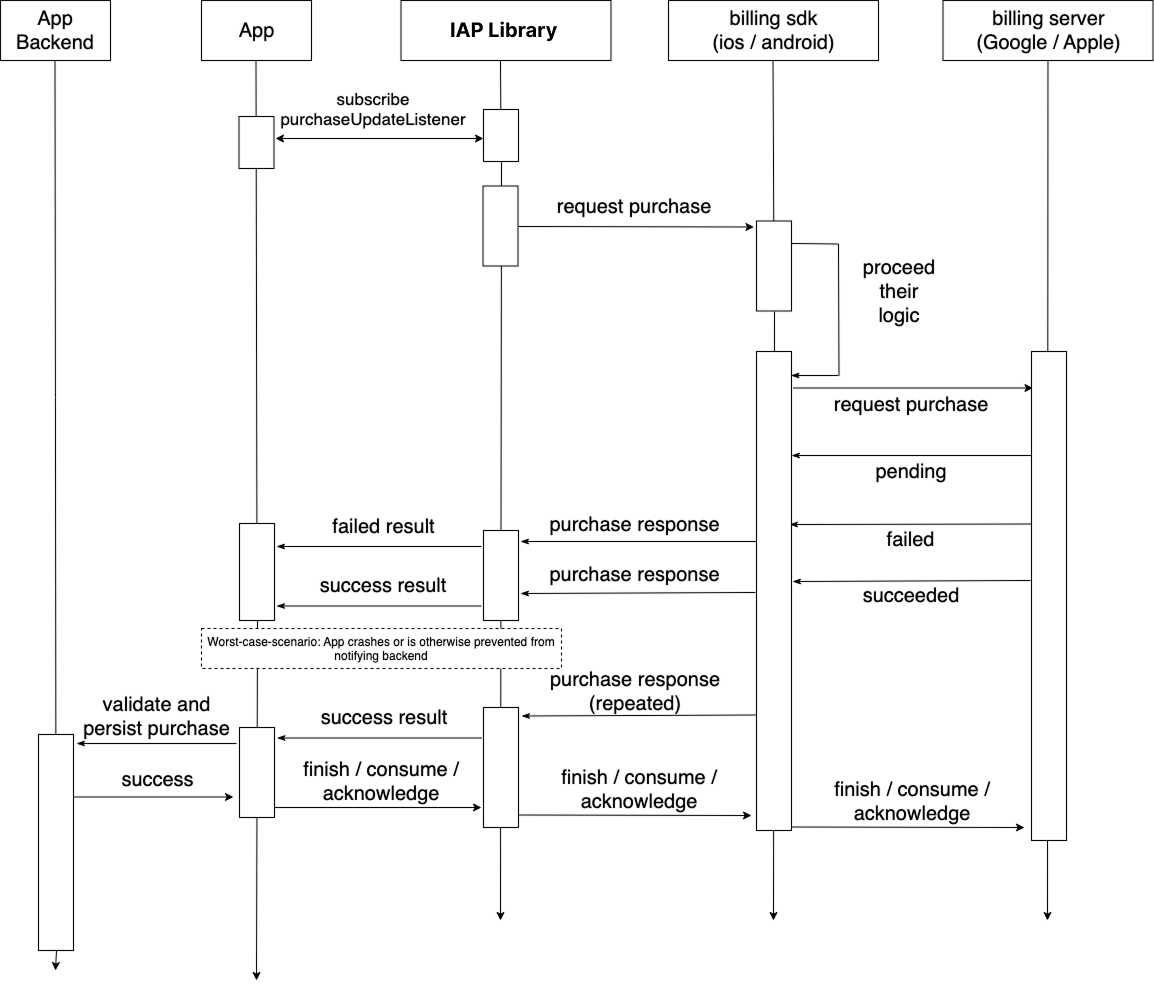
Lifecycle Phases
1. Connection Phase
// Initialize connection to store
final connected = await FlutterInappPurchase.instance.initConnection();
States: disconnected → connecting → connected
2. Product Discovery Phase
// Fetch available products
final products = await iap.fetchProducts(
  skus: productIds,
  type: ProductQueryType.inApp,
);
States: idle → loading → loaded / error
3. Purchase Initiation Phase
// User initiates purchase
await iap.requestPurchase(
  sku: productId,
  obfuscatedAccountIdAndroid: userId,
);
States: idle → purchasing → purchased / failed / cancelled
4. Transaction Processing Phase
Platform handles payment and returns result via streams:
_purchaseUpdatedSubscription = iap.purchaseUpdatedListener.listen(
  (purchase) {
    // Purchase successful
    debugPrint('Purchase received: ${purchase.productId}');
  },
);

_purchaseErrorSubscription = iap.purchaseErrorListener.listen(
  (error) {
    // Purchase failed
    debugPrint('Purchase error: ${error.message}');
  },
);
5. Content Delivery Phase
// Validate purchase on your server
final isValid = await verifyPurchaseOnServer(purchase);
if (isValid) {
  await deliverContent(purchase.productId);
}
6. Transaction Finalization Phase
// Finish transaction (consume/acknowledge)
await iap.finishTransaction(
  purchase: purchase,
  isConsumable: true,
);
States: pending → finished
Purchase State Management
Track Purchase States
enum PurchaseState {
  idle,
  loading,
  purchasing,
  purchased,
  failed,
  cancelled,
}

class PurchaseManager extends ChangeNotifier {
  PurchaseState _state = PurchaseState.idle;
  PurchaseState get state => _state;

  void setState(PurchaseState newState) {
    _state = newState;
    notifyListeners();
  }
}
Pending Transactions
Handle purchases that didn't complete:
Future<void> checkPendingPurchases() async {
  final purchases = await iap.getAvailablePurchases();

  for (final purchase in purchases) {
    // Check if already delivered
    final isDelivered = await checkIfDelivered(purchase.transactionId);

    if (!isDelivered) {
      // Deliver and finish
      await deliverContent(purchase.productId);
      await iap.finishTransaction(
        purchase: purchase,
        isConsumable: false,
      );
    }
  }
}
Best Practices
- Initialize early - Connect to store on app startup
- Check pending purchases - Handle incomplete transactions on launch
- Maintain state - Track purchase states for UI feedback
- Clean up properly - End connection when no longer needed
Next Steps
- Purchases - Basic purchase implementation
- Subscription Offers - Subscription lifecycle
- Error Handling - Handle lifecycle errors